How to Make an Itemized Receipt (With Examples and Best Practices)
When users search for an itemized receipt, they usually need a receipt that clearly breaks down each product or service instead of showing only a final amount.
Itemized receipts are commonly required for:
- Business expense reimbursement
- Customer transparency
- Accounting and audits
To create different types of professional receipts, businesses now rely on tools available in the Receipt Generator section of GoSetle.
What Is an Itemized Receipt?
An itemized receipt lists every item or service separately along with quantity and price.
Unlike a simple payment receipt, it provides a full breakdown that is easier to verify and approve.
This format is widely used in sales receipts, expense receipts, and service receipts, all of which are supported under the GoSetle receipt tools.
Why Itemized Receipts Are Preferred for Business Expenses
Employers and finance teams usually prefer itemized receipts because:
- They clearly show what was purchased
- They reduce reimbursement rejections
- They help categorize expenses correctly
For this reason, many companies require employees to submit expense receipts generated using standardized receipt tools instead of handwritten slips.
What Details Must Be Included in an Itemized Receipt?
A proper itemized receipt should include:
1️⃣ Business Information
Business name, address, and contact details — these are automatically included when you generate receipts using the GoSetle Receipt Generator.
2️⃣ Receipt Information
Receipt number and date of transaction.
3️⃣ Itemized Breakdown
Each line should contain:
- Item or service name
- Quantity
- Price per unit
- Line total
This is the most important part of an itemized receipt.
4️⃣ Totals and Taxes
Subtotal, tax (VAT or sales tax if applicable), and final total.
5️⃣ Payment Method
Cash, card, or digital payment.
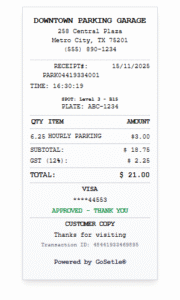
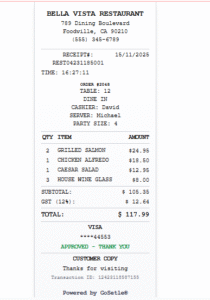
Example of an Itemized Receipt
Below is a simplified example of how an itemized receipt looks:
Itemized Receipt
Receipt No: 78421
Date: 15 Jan 2025
Item Qty Price Total
Service Fee 1 $50 $50
Printing 2 $5 $10
Subtotal: $60
Tax: $3
Total Paid: $63
This structure is commonly used in sales receipts and business expense receipts generated online.
How to Make an Itemized Receipt Online
Instead of using Word or Excel templates, most businesses now create itemized receipts online.
Using the Online Receipt Generator available on GoSetle, you can:
- Select a receipt type such as a Sales Receipt or Expense Receipt
- Add item-wise details
- Automatically calculate totals and taxes
- Download a clean, printable PDF
All receipt types are organized under the main Receipt Generator hub, making it easy to choose the right format.
Itemized Receipt vs Simple Receipt
Itemized receipts provide more clarity compared to simple receipts, which usually show only the total amount.
That’s why itemized receipts are preferred for:
- Reimbursement claims
- Business records
- Customer billing
Many users upgrade from basic receipts to itemized receipts once they start using professional receipt generators.
Digital Itemized Receipts vs Handwritten Receipts
Digital itemized receipts are:
- Easier to read
- Easier to store
- Accepted for reimbursement
- More professional
Handwritten receipts often miss details and create approval issues.
Conclusion
If you want higher acceptance for business or reimbursement purposes, itemized receipts are the safest option.
Using the GoSetle Receipt Generator allows you to create accurate, professional itemized receipts that follow global standards and work across different use cases.