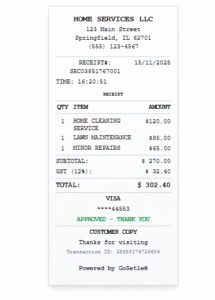
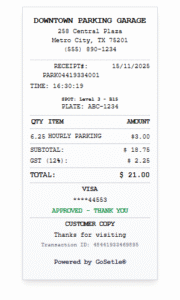
Many business owners get confused between a cash receipt and a sales receipt. Both sound similar and both are related to payments, but they are not exactly the same.cash receipt and sales receipt
In this article, we’ll clearly explain:
- What is a cash receipt?
- What is a sales receipt?
- Key differences between the two
- When to use which document
- How to generate both online with GoSetle tools
What Is a Cash Receipt?
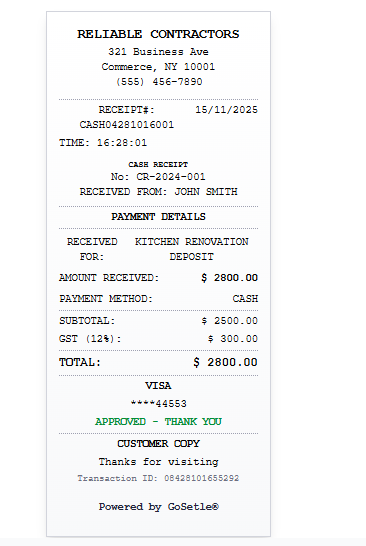
A cash receipt is a document given when payment is received in cash.
It confirms that the business has received a specific cash amount from a customer for a product or service.
A cash receipt usually includes:
- Business name and address
- Customer name (optional)
- Date and time
- Description of payment
- Amount received in cash
- Taxes (if any)
- Signature or approval
To generate this instantly, you can use the Cash Receipt Generator.
What Is a Sales Receipt?
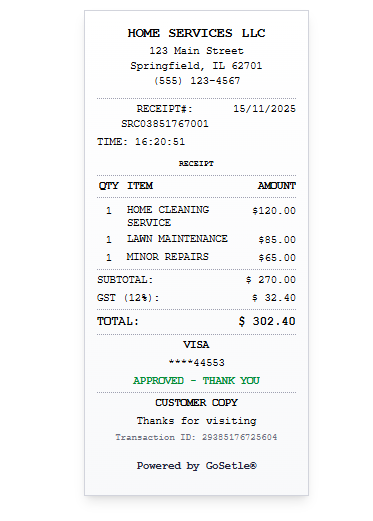
A sales receipt confirms that a sale has happened and payment has been made. But, unlike a pure cash receipt, the payment mode can be:
- Cash
- Credit or debit card
- Bank transfer
- UPI or mobile wallet
A sales receipt usually shows:
- Business details
- Items sold or services provided
- Quantity, rate and amount
- Tax components (GST/VAT)
- Total amount
- Payment method (cash, card, UPI, etc.)
You can create a sales receipt using a Sales Receipt Generator (add your tool URL, e.g. https://gosetle.com/receipt/sales-receipt-generator).
Key Differences Between Cash Receipt and Sales Receipt
| Point | Cash Receipt | Sales Receipt |
|---|---|---|
| Purpose | Proof that cash was received | Proof that a sale was completed |
| Payment Mode | Only cash | Cash, card, bank, UPI, etc. |
| Level of Detail | Basic payment info | Detailed sale info (items, tax, etc.) |
| Usage | When recording cash inflow | When recording any completed sale |
In simple terms:
- Cash receipt = focus on how payment was received (cash).
- Sales receipt = focus on what was sold and how much was paid.
When Should You Use a Cash Receipt?
Use a cash receipt when:
- You receive cash deposits from customers
- You collect cash advances
- You record small manual cash payments (like repairs, small services)
- You want clear proof that the payment was made in cash, not online
For example:
- A tutor receiving monthly fees in cash from a student
- A small repair shop collecting cash for a service
- A landlord receiving a small cash advance
In all these cases, you can quickly generate a cash receipt using the Cash Receipt Generator.
When Should You Use a Sales Receipt?
Use a sales receipt when:
- A product or service has been sold
- Payment has been made (via any method)
- You want to show items, quantity, tax and total clearly
- You want a full breakdown of the transaction
For example:
- A retail store selling multiple items
- A restaurant billing a customer for food, drinks and taxes
- A service company billing for monthly subscription or package
This type of receipt is ideal for businesses where item-wise billing is important.
Can You Use Both Together?
Yes, in some cases, businesses use both:
- A sales receipt to show the detailed breakdown of what was sold.
- A cash receipt to separately record that the amount was received in cash.
However, for most small businesses, one document is enough, as long as it:
- Shows what was sold
- Shows how and when payment was received
Paper vs Digital Receipts for Cash and Sales
Whether it is a cash receipt or a sales receipt, you have two options:
1. Paper Receipts
- Handwritten or printed
- Easy to give directly to the customer
- But can get lost or damaged easily
2. Digital Receipts
- Created online and saved as PDF
- Can be shared by email, WhatsApp or SMS
- Easy to store and search later
- Looks more professional
With tools from the GoSetle Receipt Generator hub, you can create both cash receipts and sales receipts digitally in a few steps.
How to Create Cash and Sales Receipts Online
Here’s a simple process:
- Visit the GoSetle Receipt Generator hub.
- Choose the receipt type:
- Cash Receipt Generator
- Sales Receipt Generator
- Enter your business details.
- Add customer information and transaction details.
- Select payment method (for sales receipt).
- Click Generate and download or print the PDF.
Conclusion
Basically Both cash receipts and sales receipts are important for running a professional and compliant business.
- Use a cash receipt when you want to highlight that the payment was made in cash.
- Use a sales receipt when you want to show detailed items and totals for a sale.
Accordingly Whichever you need, you don’t have to create them manually. Just use the online tools available on the GoSetle Receipt Generator hub and generate clean, professional receipts in seconds.