Free Cash Receipt Generator Online – Create & Download Cash Receipt in PDF
✅ INTRODUCTION
A cash receipt is an official proof that a payment has been received in cash for products or services. With the GoSetle Free Cash Receipt Generator, you can easily create professional cash receipts online in just a few seconds. Simply enter your business details, customer name, payment amount, GST (if applicable), and download your cash receipt instantly in PDF format.
This online cash receipt maker is perfect for small businesses, contractors, freelancers, shop owners, and service providers who want fast, accurate, and legally acceptable cash receipts without using complex accounting software.
✅ WHAT IS A CASH RECEIPT?
A cash receipt is a document given to a customer as proof that payment has been received in cash. It includes important details such as the business name, customer name, date of transaction, amount paid, payment purpose, and payment method.
Cash receipts are widely used in:
- Retail shops
- Service businesses
- Construction and renovation work
- Freelance services
- Small and medium enterprises (SMEs)
✅ WHO CAN USE THIS CASH RECEIPT GENERATOR?
Our online cash receipt generator is ideal for:
- ✅ Small shop owners
- ✅ Contractors & builders
- ✅ Freelancers & consultants
- ✅ Wholesalers & distributors
- ✅ Service providers
- ✅ Startups & MSMEs
Anyone who receives payments in cash and needs a professional receipt can use this tool for free.

✅ HOW TO USE THE CASH RECEIPT GENERATOR (STEP-BY-STEP)
Creating a cash receipt with GoSetle is very easy:
- Enter your business name, address, and contact number
- Add the receipt number, date, and time
- Enter the customer name
- Mention the purpose of payment
- Add the subtotal, GST (if applicable), and total amount
- Select the payment method (Cash)
- Click on Generate Receipt
- Download or print the receipt in PDF format
Your professional cash receipt is ready within seconds.
✅ FIELDS INCLUDED IN THIS CASH RECEIPT
Our cash receipt generator includes all essential professional fields:
- Business name
- Business address
- Phone number
- Receipt number
- Date & time
- Customer name
- Payment purpose
- Subtotal amount
- GST amount
- Total amount received
- Payment method (Cash)
- Transaction ID
- Approval status
- Customer copy note
These fields ensure your receipt looks complete, professional, and legally valid.
✅ WHY USE OUR CASH RECEIPT GENERATOR?
- ✅ 100% Free to use
- ✅ No login or signup required
- ✅ Instant PDF download
- ✅ Mobile & desktop friendly
- ✅ Professional receipt format
- ✅ GST support
- ✅ Secure & fast
- ✅ Works for all business types
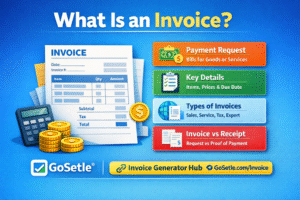
✅ DIFFERENCE BETWEEN INVOICE & CASH RECEIPT
| Invoice | Cash Receipt |
|---|---|
| Issued before payment | Issued after payment |
| Request for payment | Proof of payment |
| Used for credit sales | Used for cash payments |
| Shows amount to be paid | Shows amount received |
An invoice asks for money, while a cash receipt confirms that money has been received.
✅ USE CASE EXAMPLES (e.g.)
- Cash receipt for home renovation deposit
- Cash receipt for freelance service payment
- Cash receipt for retail product sale
- Cash receipt for advance payment
- Cash receipt for consulting services
✅ FAQs
1. Is this cash receipt legally valid?
Yes, this cash receipt can be used as proof of payment for business and personal records.
2. Can I add GST to the receipt?
Yes, you can add GST amount and it will be shown separately.
3. Is this cash receipt generator free?
Yes, it is completely free to use.
4. Can I download the receipt in PDF?
Yes, you can instantly download and print the receipt.
5. Is login required to use this tool?
No, you can use this tool without any registration.
6. Can I use this receipt for my shop or business?
Yes, it is perfect for shops, contractors, freelancers, and businesses.
7. Is customer data saved?
No, your data is not stored permanently for safety and privacy.
8. Can I edit the receipt after generating it?
Yes, simply change the input values and regenerate the receipt.