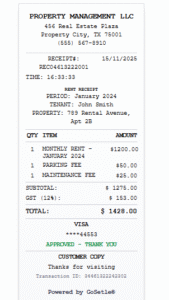
How to Generate a Rent Receipt Without Watermark (Free & Printable PDF)
Many tenants and landlords search for rent receipts without watermark because watermarked receipts often look unprofessional and may get rejected for official use.
Whether you need a rent receipt for:
- Office reimbursement
- Business records
- Personal documentation
- Rental payment proof
a clean, watermark-free rent receipt is always preferred.
In this guide, you’ll learn:
- Why people avoid watermarked rent receipts
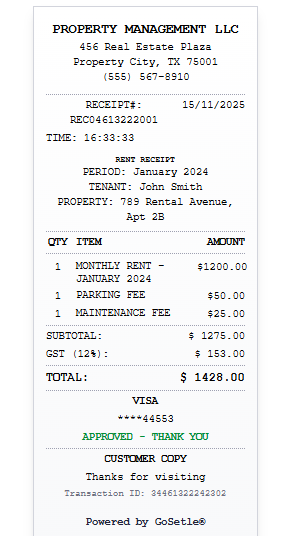
- What a proper rent receipt should include
- How to generate a rent receipt without watermark
- Common mistakes to avoid
Create Free : Rent Receipt
Why Do People Want Rent Receipts Without Watermark?
This is a very common global search, especially outside India.
People avoid watermarked receipts because:
1. They Look Unprofessional
Watermarks like “Sample”, “Demo”, or tool branding reduce trust.
2. Reimbursement Rejection Risk
Many HR and finance teams reject receipts that look like samples.
3. Legal & Record Issues
For audits or records, clean documents are always preferred.
4. Landlord–Tenant Trust
A watermark-free receipt looks more official and reliable.
That’s why users specifically search for rent receipt without watermark.
What Should a Proper Rent Receipt Include?
No matter the country, a professional rent receipt should clearly show:
- Landlord name
- Tenant name
- Property address
- Rent amount paid
- Rent period (month or date range)
- Payment date
- Payment method (cash, bank transfer, etc.)
- Signature or acknowledgement (optional)
If any of these are missing, the receipt may be questioned.
How to Generate a Rent Receipt Without Watermark (Step-by-Step)
You don’t need Word templates or paid software.
Using a rent receipt generator from the GoSetle® Receipt HUB, you can create a clean, watermark-free receipt easily.
Step 1: Open the Rent Receipt Tool
From the main receipt tools section, select the Rent Receipt Generator.
Step 2: Enter Landlord & Tenant Details
Fill in:
- Landlord name
- Tenant name
- Rental property address
Step 3: Add Rent Payment Information
Include:
- Rent amount
- Month or rental period
- Payment date
- Payment mode
Step 4: Generate the Receipt
Click generate and download the rent receipt as a PDF.
The receipt is:
- Clean
- Printable
- Free from watermarks
- Ready for official use
Digital Rent Receipts vs Handwritten Receipts
| Digital Rent Receipt | Handwritten Receipt |
|---|---|
| Clean & readable | Often unclear |
| Printable PDF | Paper can fade |
| Easy to share | Hard to resend |
| No watermark | May look informal |
| Accepted for records | Sometimes rejected |
This is why most users now prefer digital rent receipts.
Who Needs Rent Receipts Without Watermark?
This type of receipt is commonly needed by:
- Employees claiming rent reimbursement
- Freelancers maintaining expense records
- Tenants for personal proof
- Landlords issuing monthly receipts
- Businesses renting office space
In all these cases, a watermark-free receipt avoids unnecessary questions.
Common Mistakes to Avoid
When creating rent receipts, avoid:
- Using “Sample” or demo receipts
- Missing rent period (month/year)
- Incorrect amount or date
- Using screenshots instead of PDFs
- Submitting watermarked receipts
A clean, correctly generated receipt prevents future issues.
Conclusion
If you need a rent receipt for official or professional use, avoid watermarked templates.
They often create trust and approval problems.
Using an online rent receipt generator allows you to create:
- Clean
- Printable
- Watermark-free
- Professional rent receipts
This is the easiest and safest way to generate rent receipts accepted everywhere.